
Privacy policy summaries
Turn long disclosures into short, structured explanations—your AI privacy policy summarizer layer for everyday browsing.
AI privacy scanner · Privacy policy summary tool · Chrome
Privacy Lens is an AI-powered privacy policy analyzer that instantly reveals what websites collect, how they use your data, and who they share it with. Instead of reading long legal documents, you get clear, visual insights with simple icons and plain-English explanations — directly while you browse. Understand tracking, data sharing, and hidden practices in seconds, and decide whether a website deserves your trust before you click “Agree”.
Built for people who want a serious privacy transparency tool without reading 5,000 words on every new tab.
Add Privacy Lens from the official Chrome Web Store and get instant policy context on supported sites.
Privacy Lens is a Chrome privacy extension that helps you understand what websites say they do with your data. It is designed as an AI browser privacy assistant: it highlights collection, purposes, and sharing in plain language—plus visual cues—so you can decide whether a site deserves your trust.
If you have searched for a privacy policy summary tool, a website privacy checker, or a terms and privacy summarizer workflow, Privacy Lens is built around the same job-to-be-done: reduce friction between you and the policy text publishers already published.
A simple flow engineered for scanning and comprehension—not for replacing your judgment.
Step 1
Privacy Lens works in the browser context to help locate relevant privacy policy text for the site you are evaluating.
Step 2
The extension applies AI to extract the parts that map to real user questions: what is collected, why, and who receives it.
Step 3
You get readable summaries instead of dense legal boilerplate—ideal when you want a fast read before you sign up, pay, or share sensitive info.
Step 4
Icons and indicators help you scan quickly and compare sites with a consistent mental model.
Privacy Lens focuses on the questions people actually ask from a privacy policy analyzer.
Turn long disclosures into short, structured explanations—your AI privacy policy summarizer layer for everyday browsing.
See what categories of data are described as collected and for what purposes—useful when you are comparing vendors or signing up for a new service.
Understand “who gets access” beyond the first-party site: partners, analytics providers, ad tech, and other recipients when stated in the policy.
Icons and visual signals help you skim faster than paragraphs alone— especially when you are tired or on mobile.
Designed to reduce tab-hopping and copy/paste loops while you decide whether to continue on a site.
Install from the Chrome Web Store and stay on the official listing for updates and integrity signals.
A representative screenshot of the extension experience helps you understand the product UI before installing.
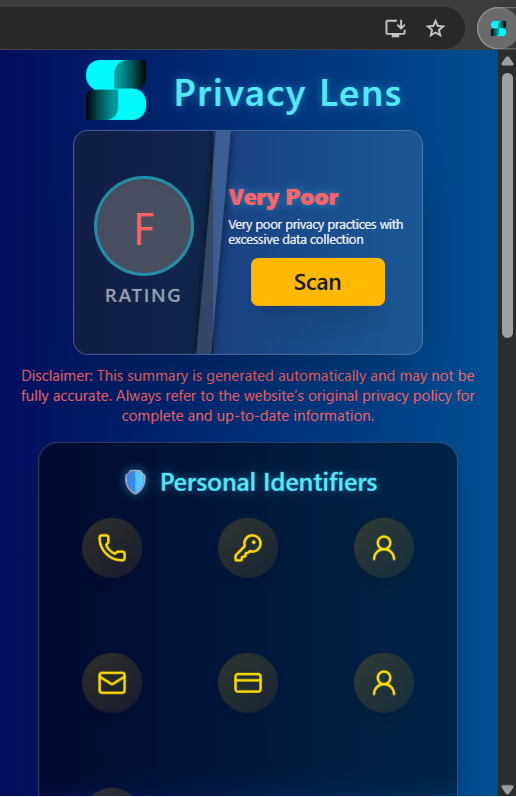
Policies are long by design. Privacy Lens compresses reading time by pointing you to the highest-signal clauses first.
Legal language hides uncertainty. The extension highlights what is explicitly stated—and where the policy is vague.
Use summaries as an input to consent: sign-ups, purchases, location sharing, and “free” services funded by data.
This comparison explains the practical difference for most users—not a claim of legal completeness.
| Topic | Manual reading | With Privacy Lens |
|---|---|---|
| Time to first useful answer | Often 10–30+ minutes per site | Typically much faster for a first-pass understanding |
| Consistency | Depends on your patience and expertise | Applies a repeatable model across many sites |
| Finding sharing + third parties | Easy to miss scattered disclosures | Surfaces sharing-related signals when present in the policy text |
| Mobile reading experience | Tiny text, lots of scrolling | Summaries and visuals are easier to scan on small screens |
| Legal certainty | You can still miss nuances | Still not legal advice; verify critical details when it matters |
Trust-first positioning
Privacy tools should be understandable. This page is intentionally explicit about what Privacy Lens is for, what it is not, and where to read the extension’s disclosures. Prefer the official Chrome Web Store listing for install integrity.
Answers mirror the structured FAQ data on this page for consistency with search engines.
Privacy Lens is a free Chrome extension that acts as an AI browser privacy assistant. It finds a site’s privacy policy, analyzes it with AI, and presents a plain-language privacy policy summary plus structured signals about data collection, use, and sharing.
When you use the extension on a supported page, it helps locate the policy text and runs an AI-powered analysis to extract the parts most people care about: categories of data, purposes, retention hints where available, and third parties. Results are shown as readable summaries and visual privacy indicators.
Today, Privacy Lens is distributed on the Chrome Web Store for Chromium-based Chrome browsers. Other browsers are not officially supported yet.
It functions as both in practice: it is a privacy policy analyzer focused on policy text, and a website privacy checker in the sense that it helps you quickly understand a site’s stated practices before you proceed on that site.
The product is optimized around privacy policies. Depending on the site and version, related legal pages may be less thoroughly covered than the primary privacy policy.
Privacy Lens is offered as a free extension. Optional donations may be available to support development, but core functionality is aimed at staying accessible.
No. Privacy Lens is an informational assistant designed to improve transparency and save time. It does not replace your own review, company disclosures, or professional legal advice where that is required.
AI outputs can be incomplete or imperfect—especially when a policy is vague, changes frequently, or uses non-standard language. Use summaries as a starting point and verify important details on critical flows like payments, health, or children’s data.
Use the Privacy Policy and What’s New pages linked in the site footer and navigation. Those pages describe site/extension policies and release notes context.
Install Privacy Lens from the official Chrome Web Store listing linked from this page. Prefer the official store URL to avoid impersonation.
If you want an AI privacy scanner that respects your time, start with the official Chrome Web Store install—then come back to What’s New for release notes.